
 Ciudad inteligente
 Fabricación inteligente
 Médico inteligente
 IoT y computación de borde
 Inteligencia artificial
 One-Stop IPC Hub
15.6″ Industrial Touchscreen Display & ordenador personal: 5 Industrial Equipment Applications
Most OEMs I talk to land on 15.6″ for the same practical reason. It’s the largest panel that still fits a control cabinet without dominating the machine. You get a Full HD canvas for alarms, trend charts, and camera feeds, but the cutout stays small enough for flush, arm, or embedded mounting.
If you’re speccing a display for a new build or a retrofit, 15.6″ is also the easiest size to source. It’s the most common OEM integration format on the market, so enclosures, mounting arms, and spare panels are already out there, and lead times tend to beat the odd sizes.
What you’re generally getting at this size:
- 1920 × 1080 Full HD, enough to show alarm grids, trend lines, and a camera feed at the same time
- 16:9 pantalla ancha, which matches how most HMI and SCADA layouts are built (4:3 wastes the edges)
- IP65 front, seals out dust, coolant mist, and washdown spray
- Amplia temperatura de funcionamiento, usually -10°C to 60°C, so it survives unheated shops and hot enclosures
- hdmi, VGA, and DVI inputs, so it talks to whatever PLC, industrial PC, or controller you already run
- P-CAP or resistive touch, glove-friendly and built for constant operator contact
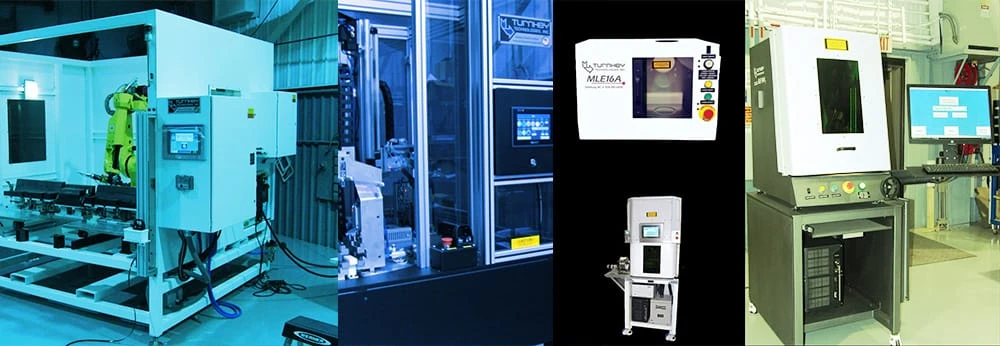
Hot air cold stake: watch the temperature and pressure live
Hot air cold staking joins thermoplastics and mixed materials with a controlled heat-and-pressure cycle. The display is the process control face here. Real-time temperature curve, stake force profile, cycle count, alarm history, and the recipe parameters. Operators load a preset for each material combo and watch each cycle against its target.
El 16:9 format earns its keep on this one. You can put the temperature-vs-time curve and a numeric readout side by side, which a smaller screen can’t do without forcing the operator to flip views. That side-by-side view is what you want during process development and first-article checks. And a fanless display won’t kick particulates into the welding area.
| What you need | Suggested spec | Why |
|---|---|---|
| Operating temp | -10°C a 60°C | Heated enclosures run hotter than the room |
| Tocar | P-CAP, glove-capable | Heat-resistant gloves during setup |
| Brillo | 350 cd/m² or more | Variable shop lighting |
| Interface | RS485 / RS232 + USB | Talks to the temp controller and PLC |
| Mount | Flush panel | Clean fit into the machine housing |
| Duty | 24/7 rated | Staking lines often run back-to-back shifts |
flush mount 15.6″ industrial touchscreen PC
Look for a display with OSD lockout. On staking equipment, an operator brushing the screen and changing a setting mid-run is a real quality headache, and lockout stops it before it starts.
Laser maker: parameters plus the vision feed
Fiber, CO2, and UV laser markers use the 15.6″ as both the machine HMI and, on some builds, a live preview from the vision system. Operators set power, frequency, speed, and focus through the touch panel, preview the vector file, and watch the cut progress. Add a camera and the same screen shows mark placement verification in real time.
Laser equipment leans on Full HD because the vector preview needs to render at actual scale. The 15.6″ is big enough to show the whole design without zooming, y 16:9 matches what most laser controller boards output. IP65 matters here too. Laser cutting throws metal vapor and fine particulate that settle on everything nearby.
| What you need | Suggested spec | Why |
|---|---|---|
| Resolución | 1920 × 1080 | Vector preview at scale |
| Brillo | 400 cd/m² or more | Overhead lighting on the floor |
| Tocar | 10-point P-CAP | Pinch to zoom files, tap to select |
| Front sealing | IP65 | Metal vapor and fine dust |
| Entrada de video | hdmi + DVI | Run HMI and vision feed (PiP or split) |
| Shock | CEI 60068 rated | Lasers vibrate mechanically |
| Mount | Arm or panel | Position it away from the head |
ARM-mounted 15.6-inch industrial touchscree display
If you can get a display with dual video inputs, use one screen for the HMI and the other for the camera feed. That’s one monitor instead of two bolted to the frame, which simplifies the build and the spares.
Robótica: the cell’s status window
Robot cells of every kind use the 15.6″ as the main human interface. Six-axis arms, SCARA pick-and-place, cobots, AGVS. The display shows joint angles, end-effector position, I/O state, the program editor, and a live trajectory view. In a multi-robot cell, one large-format panel can replace several small HMI screens.
Teach pendants are usually handheld, and that’s right for programming. But for a fixed cell that runs mostly on its own, a mounted 15.6″ gives you a permanent, glanceable status window that the whole crew can read at once. The widescreen fits the joint-angle graphs and I/O matrices that robot software loves to draw.
| What you need | Suggested spec | Why |
|---|---|---|
| Comunicación | Ethernet (TCP/IP), RS485 | Connects to ABB, Fanuc, Kuka, Estun, etc.. |
| Tocar | P-CAP, multi-touch | Program editing, drag-to-jog, zoom |
| Touch response | 25ms report or faster | Real-time feel during manual jogging |
| Brillo | 300 cd/m² or more | Fluorescent or LED overhead light |
| Front sealing | IP65 front, IP40 rear | Chips and grinding dust |
| Mount | VESA 100 × 100 or arm | Keep it outside the robot’s reach |
| Fuerza | 24En DC | Standard robot cell rail |
15.6″ VESA-mounted Android Touchscreen Panel PC
For retrofits, pick a display with standard VESA mounting. That lets you use off-the-shelf arms and brackets instead of paying for custom fabrication. And confirm it speaks your robot brand’s protocol before you order samples, not after.
Hot plate welder: catch temperature drift before it makes scrap
Hot plate welders heat platens to join plastic or composite parts. The display is the welding controller: live platen temperature across multiple thermocouples, weld force, the pressure profile, cycle time, part count, and pass/fail status. It also stores recipes by part number, so switching products is a one-tap change.
Weld quality tracks straight back to temperature and pressure consistency, which is why the screen layout matters. A 15.6″ widescreen shows the temperature-vs-time curve next to the numeric panel, so an operator or quality engineer sees the whole process in one view. That’s what makes temperature drift visible before it turns into a batch of bad welds, and it feeds straight into statistical process control.
| What you need | Suggested spec | Why |
|---|---|---|
| Touch report | 100Hz or better | Recipe input without lag |
| Tamaño de pantalla | 15.6″ | Curve and data on one view |
| Data log | USB or SD export | Traceability records |
| Alarms | Visual plus audio | Stop a failed weld early |
| Brillo | 350 cd/m² or more | Lighting varies across shops |
| Interface | USB, RS485, Ethernet | Multi-point thermocouples and PLC |
| Operating temp | Extended range | The equipment makes real heat |
15.6-inch industrial display PC with RS485
Get a display with built-in data logging or external storage export. Hot plate weld records show up constantly in ISO 9001, IATF 16949, and customer quality audits. Writing weld parameters down by hand is slow and wrong often enough that it’s not worth the risk.
Assembly line: one screen, three jobs
On an assembly station, the 15.6″ pulls triple duty. It’s the HMI for the PLC-controlled tools (screwdrivers, dispensers, presses, vision gates). It’s the electronic SOP, showing step-by-step instructions and tolerances. And it’s the quality terminal, running inspection checklists and pushing measurements to the MES. Some stations also run a KPI dashboard on it: unit count, cycle time, OEE, defect rate.
The size is the point here. A tech standing at the station should read the current step and its tolerance without leaning in. 15.6″ shows a full A4-landscape work instruction without scrolling. And when you run the same form factor across every station on a line, your enclosure design and your spare-parts drawer both get simpler.
| What you need | Suggested spec | Why |
|---|---|---|
| Tamaño de pantalla | 15.6″ | Full work instruction, no scrolling |
| Resolución | 1920 × 1080 | Sharp text at normal zoom |
| Tocar | P-CAP, multi-touch | Navigate SOPs, log data |
| Brillo | 300 cd/m² (400+ in bright shops) | Floor lighting varies |
| Front sealing | IP65 | Dust, oil mist, cleaning spray |
| Connectivity | hdmi + USB + Ethernet | PLC, MES server, barcode scanner |
| Mount | Arm or panel | Adjust for operator height |
| SO | ventanas / linux / Androide | Matches your SCADA and MES stack |
| Audio | Built-in speaker | Prompts when the step changes |
For MES, choose a display that speaks a standard industrial protocol: Modbus TCP/RTU, OPC-UA, or MQTT. That skips custom driver work and cuts integration time, which is usually the part that blows the schedule.
Picking the right 15.6″ mostrar: a checklist
Run this against any 15.6″ panel before you buy.
Mostrar
- Resolución: 1920 × 1080 if the screen shows data-heavy HMI or SOP pages
- Brillo: 300 cd/m² standard, 500+ if the shop is bright or near a window
- Contraste: 800:1 or better, so values don’t blur into the background
- Ángulo de visión: 170°+ horizontal and vertical, or the colors shift when you stand off-axis
Touch and interface
- P-CAP for glove-friendly, multi-touch HMI; resistive if budget is tight or the environment is noisy
- Touch report rate of 100Hz or better for responsive interaction
- hdmi + DVI + VGA for the widest controller compatibility
- USB HID touch, which is plug-and-play on most OS platforms
Environment and build
- IP65 front at minimum for the floor and dusty spaces
- Confirm the operating temp covers your worst-case ambient, not just the comfortable one
- VESA 100 × 100, panel mount, or arm mount to match the enclosure
- 12V–36V DC wide-range power if you want to skip an extra supply
Cumplimiento
- CE for the EU
- FCC for the US
- RoHS
- UL or cUL
Preguntas frecuentes
Will a 15.6″ industrial display survive coolant mist and metal chips on the floor?
Sí, if it’s rated IP65 on the front with an aluminium or powder-coated steel housing. Coolant mist, cutting fluid, and fine chips are exactly the conditions IP65 is built for. Just don’t expose the rear (usually IP40) directly to spray.
P-CAP or 5-wire resistive, and which do I want?
P-CAP gives you multi-touch (up to 10 points), faster response, and works with gloves or wet hands. That’s why it’s the default for operator-facing HMI now. Resistive is single-touch and needs pressure, but it holds up in high-EMI environments and works with any stylus or gloved finger. Go P-CAP unless you have a reason not to.
How do I connect a 15.6″ display to my existing PLC?
Usually the display takes HDMI/VGA/DVI from an industrial PC, or it talks serial (RS485/RS232) if it has an embedded HMI controller. For Modbus, OPC-UA, or Ethernet/IP, the display runs SCADA software on the attached industrial PC. Confirm protocol support with the vendor and test a sample before you commit to a batch.
What mounting options exist for 15.6″ pantallas industriales?
Three that cover almost everything. VESA 100 × 100 arm mount, the most common and best supported. Panel (flush) mount, where the display sits flush in a cutout in the housing. And desktop or stand mount for free-standing quality stations.Ours also do DIN rail for control cabinet work.
Can these run 24/7?
Industrial-grade 15.6″ panels are rated for continuous duty, typically 50,000+ hours of backlight life. Consumer displays are not, and they fail early. If the equipment runs continuous shifts, spec industrial grade and don’t compromise on it.
Can I get a 15.6″ display with my logo for OEM integration?
Most manufacturers do. Bezel silk-screening, custom bezel color, custom cable lengths and connectors, and modified firmware are all standard options. Custom branding usually starts around 50–100 units. Send the vendor your mechanical drawings and branding requirements and they’ll quote it.