
 Ville intelligente
 Fabrication intelligente
 Médical intelligent
 IoT et informatique de pointe
 Intelligence artificielle
 Hub IPC à guichet unique
Fanless Android Industrial Panel PCs for Warehouse Automation: Pick-by-Voice, Pick-by-Vision, AGV & LGV Control
A fanless Android industrial panel PC is a sealed, fan-free touchscreen computer that boots Android, tolerates dust, humidité, vibration and electrostatic discharge (ESD), and runs continuously on industrial power, typically in 10–15-inch formats for vehicles, workstations and picking stations. Consumer tablets are designed for offices and living rooms, not for shift after shift of warehouse dust, freezer air and forklift impact. That mismatch is why so many automation projects fail in the last meter, long after the software is finished.
You know the feeling: the WMS integration is clean, the algorithm is proven, the go-live is booked. Then the cheap tablets reboot at 3 a.m. in the second shift and glove-touch stops responding in the cold aisle. Your team spends three weeks writing hardware workarounds instead of shipping features. Order picking alone can account for more than 50% of a distribution center’s labor cost, so every hour of downtime is billed to the operation.
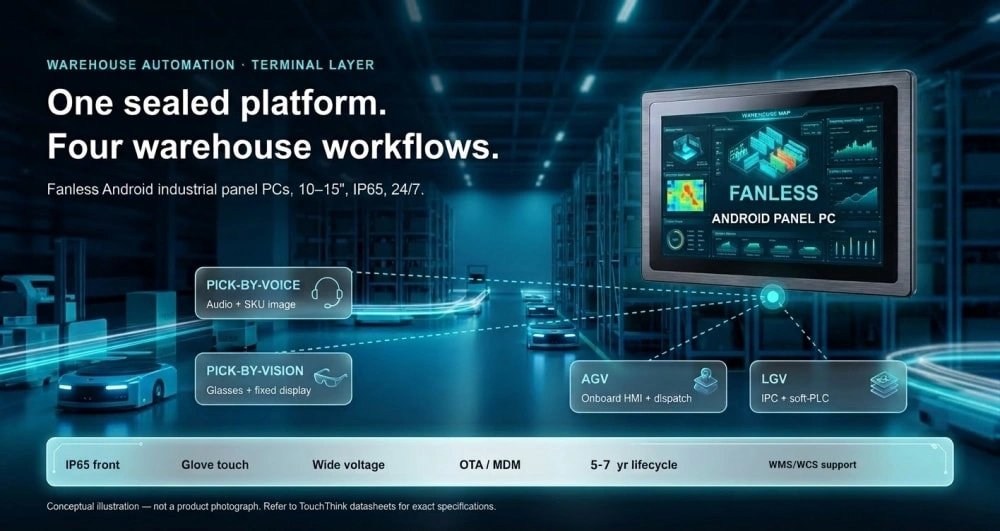
This guide is written from the integration side of the table. It is for software architects and integrators who must choose one hardware platform for pick-by-voice, pick-by-vision, AGV and LGV control, without four BOMs, four image builds and four support contracts. We cover the hardware baseline, how each workflow uses it, the field data, and how to map scenarios to specifications.
Key Takeaways
- One 10–15″ fanless Android industrial panel PC can serve voice picking, vision picking, AGV onboard HMIs and LGV control, collapsing four hardware SKUs into one managed platform.
- Voice-directed picking delivers 15–35% productivity gains and up to 99.9% accuracy; DHL’s vision-picking pilot reached +25% efficiency with 20,000+ items (DHL).
- The decisive specs are not CPU speed but IP65 sealing, wide-temperature operation, Protection ESD, wide-voltage input and 24/7 duty.
- Android matters as much as the enclosure: fast boot, OTA updates, MDM enrollment, kiosk mode and a mature SDK cut integration effort.
- Demand a 5-7 year lifecycle and documented MTBF before committing; the terminal outlives much of the software around it.
Want to jump straight to the configuration options? Jump to the selection matrix ↓
Why Warehouse Automation Stalls at the Terminal Layer
Projects are judged by their cleverest component: the routing engine, the vision overlay, the fleet scheduler. The terminal layer, the screen a worker touches or a vehicle carries, gets specified last, often by price. That is costly: the terminal is the only part of the stack living in dust, cold and vibration.
The Hidden Cost of Consumer-Grade Tablets in Dust and ESD
Picture a peak-season go-live. An integration lead watches a consumer tablet reboot for the third time in an hour. The app is fine. Dust has been drawn through a cooling fan into a connector; static from a tote has reset an unprotected board.
By week two his team has added rugged cases, spares and a nightly reboot script. None of this touches the WMS, yet all of it eats the margin.
Consumer tablets fail predictably: a fan pulls in dust, open ports admit moisture, ESD resets electronics, and batteries are not rated for 24/7 shifts or unheated areas. None of this appears in a two-week office pilot. The impact is re-imaging, retraining and re-running acceptance tests. A cheap terminal becomes the costliest line item once support labor is counted.
What System Integrators Actually Need from a Warehouse Terminal
Integrators need a predictable network node: a sealed touchscreen computer with a defined OS image, remote management, known I/O and a supply chain that still ships the same model in year seven.
- Sealed, fanless chassis — IP65 front, passive cooling, no fan to ingest dust.
- Glove and wet-hand touch — no removing PPE at every scan.
- Industrial power — wide-voltage DC for vehicle batteries or 24 V supplies.
- Manageable Android — kiosk mode, MDM, OTA and an SDK for your APKs.
- Stable interfaces — USB, RS232/RS485, dual Gigabit LAN.
- Long availability — a 5-7 year lifecycle and stated MTBF.
Miss one and integration cost migrates back into your team.
The Hardware Baseline — Fanless Android Industrial Panel PCs, 10–15 Inches
Four workflows sound like four products, but they share a baseline: a fanless chassis, an IP65 front, Androïde, a 10–15″ afficher, and industrial power. Get this layer right once and the scenarios become configuration choices.
Sans ventilateur, IP65 and Wide-Temperature Design
Removing the fan removes the only moving part: no filter to clean and no negative pressure pulling dust through gaps. Heat leaves through the chassis, so a metal bracket doubles as a heat path. An IP65 front panel resists dust and low-pressure water jets from daily cleaning, routine in food and beverage processing.
Wide temperature is the companion requirement. A vehicle terminal may sit at 45 °C in a summer charging area, then enter a chilled zone near 0 °C. Specify the range rather than assuming “industrial” covers it.
Why Android for Warehouse Clients
Android earns its place through operations. Boot is fast, so a vehicle terminal is usable at shift start. Memory footprints on ARM platforms leave headroom for a WMS client, a dashboard and a scanner service at once. For integrators, these capabilities matter most:
- Kiosk mode locks the device to your application.
- MDM support pushes configuration and apps to hundreds of units.
- OTA firmware updates ship fixes between site visits.
- A mature SDK shortens the work of binding headsets, ring scanners and serial devices.
- Web-friendly runtimes let teams reuse a WMS web client across terminals.
That is why our Android ARM panel PCs are the default start for voice, vision and dispatch terminals, with an x86 option reserved for heavier workloads.
Choosing 10, 12 ou 15 Inches — A Size-Selection Matrix
The 10–15″ band keeps appearing for a reason: it is readable at a gloved worker’s distance, still fits a vehicle dashboard or bench, and leaves room for a mount. Below 10″, SKU images are hard to read; above 15″, the unit dominates a compact cab.
| Taille de l'écran | Best-fit scenario | Viewing distance | Key advantage |
|---|---|---|---|
| 10.1″ | AGV onboard HMI, compact voice station | 40–60 cm | Small footprint on a vehicle mast |
| 12″ | Packing bench, display-assisted voice picking | 50–80 cm | SKU image size vs. bench space |
| 15.6″ | Dispatch console, vision companion display | 70–120 cm | Multi-window WMS views and KPIs |
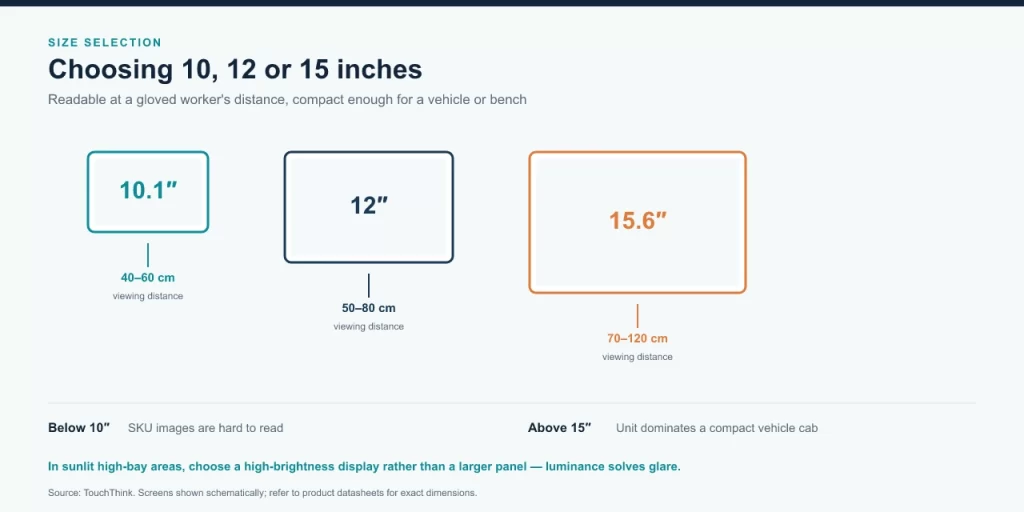
In high-bay areas with sunlight near loading doors, specify high-brightness displays rather than a larger panel. Luminance solves glare that size only makes more visible.
Industrial-Grade Reliability
Specify reliability in writing: ask for ESD/EMC ratings, an operating temperature range, a vibration profile and a manufacturer MTBF figure. Industrial panel PCs are commonly specified at 100,000+ hours MTBF with a 5–7 year lifecycle; verify these in writing rather than treating them as independent benchmarks.
The operational test is simpler: can it run 24/7 across three shifts for a season without an unscheduled reboot? If it needs nightly restarts, it is not ready.
Before you commit to a fleet, one check matters more than the datasheet. Testing your WMS client on the real enclosure is the fastest way to find out. Request a sample unit for a pilot →
One Platform, Four Workflows — Integration Architecture
The economic case: one OS image, one MDM policy, one spare-parts list, one set of driver qualifications. The technical case is stronger: one integration contract between your software stack and the hardware layer, reused four ways. TouchThink applies the same platform across unmanned production, AGV smart logistics and inspection scenarios, the broader context behind this guide.
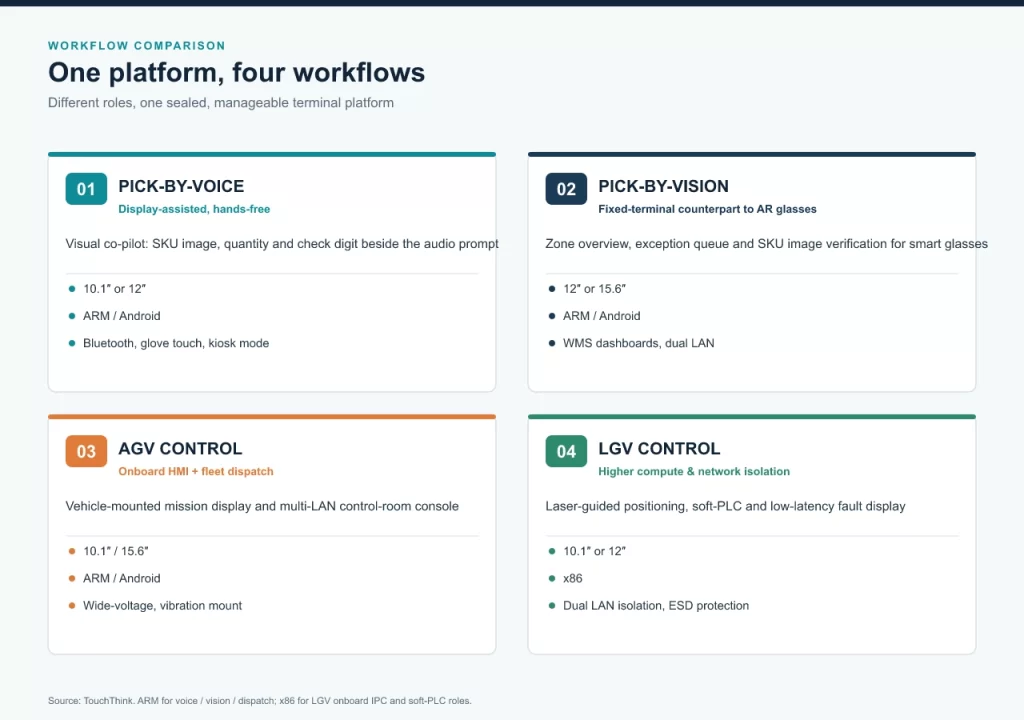
Typical Architecture (WMS/WCS → Panel PC → Peripherals & Vehicles)
- WMS/WCS layer — waves, inventory, task queues, fleet state.
- Terminal layer — the 10–15″ fanless Android industrial panel PC running your kiosk-mode client.
- Peripheral layer — headsets, scanners, printers and vehicle controller interfaces.
- Vehicle layer — AGV or LGV controllers via the WCS or a segmented vehicle network.
The panel PC is a client, not a database. It caches the task set and writes confirmations back immediately, so a network drop never leaves the operation blind. For fixed workstations, embedded panel PCs fit the bench or cart; mobile roles use the same client on a mount.
Four ways a fanless Android industrial panel PC supports warehouse automation:
- Voice picking — adds on-screen SKU confirmation to an audio-led workflow.
- Vision picking — gives smart-glass fleets a fixed place for dashboards and exceptions.
- AGV control — covers both the vehicle HMI and the dispatch console.
- LGV control — isolates navigation traffic and hosts the soft-PLC layer.
I/O and Protocol Checklist
Walk this list with your controls engineer before approval:
- USB host ports for scanners, dongles and service
- RS232/RS485 for legacy PLCs and vehicle controllers
- Dual Gigabit LAN for WMS/WCS and vehicle-network separation
- Wi-Fi with fast roaming; optional 4G for gaps
- Bluetooth for headsets and ring scanners
- GPIO or CAN where the vehicle interface needs it
- Documented SDK, MDM compatibility and OTA path
- Glove-capable touch and an IP65 front panel
A missing item usually costs more to work around than to specify upfront.
Personnalisation & OEM/ODM Options
Warehouse projects rarely fit a catalog. Customization covers panel size and brightness, I/O pinout, mounting bracket, bezel logo, OS image and pre-installed client. An OEM/ODM program lets you freeze a configuration while adapting it to new sites. Ask which changes are firmware versus mechanical, and how long a custom image stays available.
Selection Matrix & Decision Guide
Scenario-to-Specification Mapping Table
Not sure which industrial panel PC for warehouse automation fits your workflow? Use this matrix as a first pass, then validate the final spec with a pilot on your own WMS build.
| Scenario | Taille | Platform | Must-have features | Facultatif |
|---|---|---|---|---|
| Pick-by-voice station | 10.1″ or 12″ | BRAS / Androïde | Glove touch, Bluetooth, IP65, kiosk mode | Scanner cradle, cart mount |
| Vision companion display | 12″ or 15.6″ | BRAS / Androïde | WMS dashboard, SKU imagery, dual LAN | Haute luminosité, support mural |
| AGV onboard HMI | 10.1″ | BRAS / Androïde | Wide-voltage input, vibration mount, fast boot | 4G, PEUT |
| AGV dispatch console | 15.6″ | BRAS / Androïde | Double réseau local, path visualization, multi-window | Second display, PoE |
| LGV onboard IPC | 10.1″ or 12″ | x86 | Dual LAN isolation, soft-PLC headroom, Protection ESD | PEUT, extended temp |
| Packing / sorting station | 12″ or 15.6″ | BRAS / Androïde | Embedded mount, scanner I/O, 24/7 duty | Haute luminosité, printer port |
Why TouchThink
BRAS & X86 Dual Platform, 10–15″ Range, ISO9001 / CE / RoHS / FCC
TouchThink ARM-based panel PC lineup et x86-based industrial PCs cover the two compute tiers. The four workflows above share one enclosure family: ARM for voice, vision and dispatch, x86 for LGV onboard IPC and soft-PLC roles. The 10–15″ range covers vehicle dashboards, benches and control rooms without changing the mounting concept.
Quality and compliance are documented: ISO9001, CE, RoHS and FCC. Because the certificates are on file, an integrator’s approval process is shorter, with no request for them during acceptance testing.
Personnalisation, Global Delivery and 7×24 Support
Project hardware needs a project supplier. TouchThink supports customization in size, brightness, E/S, structure, branding and software image, and backs fleets with global delivery and 7×24 technical support. A Friday-night go-live is not a Monday-morning appointment.
See TouchThink’s manufacturing base and certifications for the production detail behind the line.
FAQ — Fanless Android Industrial Panel PC for Warehouse Automation
What is a fanless Android industrial panel PC?
It is a sealed touchscreen computer with no cooling fan, an Android OS and an enclosure rated for industrial conditions, typically IP65 at the front, wide-temperature operation, ESD protection and 24/7 duty. Sizes of 10–15 inches suit vehicles, benches and picking stations where a consumer tablet would fail.
Why not use a consumer tablet for pick-by-voice?
Consumer tablets lack sealed enclosures, fanless cooling, glove-touch tuning, wide-voltage power and ESD protection. In dust or cold stores they reboot or lose touch response after one shift. An industrial panel PC removes those failure modes and adds MDM and kiosk mode for fleet management.
Which screen size is best for an AGV terminal?
Most onboard HMIs use 10.1 pouces: large enough for mission status and fault codes, small enough for a vehicle mast. Use 12 inches if operators read SKU images at the vehicle, et 15.6 inches for fixed dispatch consoles needing path visualization and multiple WMS windows.
How does the terminal connect to the WMS or WCS?
Through a client application over Wi-Fi or Gigabit LAN. The terminal displays the task set, captures confirmations and writes them back in real time. RS232/RS485 and dual LAN handle legacy controllers and vehicle-network isolation. Ask for a documented SDK and protocol map first.
What does IP65 mean in a warehouse context?
The front panel is dust-tight and protected against low-pressure water jets from any direction. It matters at washdown stations, food and beverage areas and wherever fine dust is present. Confirm the rating applies to the panel as installed, and check the rear enclosure rating separately.
How long will an industrial panel PC remain available?
Industrial lines commonly offer a 5–7 year lifecycle, with manufacturers quoting MTBF above 100,000 heures. Treat these as contractual specifications: request availability and MTBF documentation in writing so fleet expansion does not force re-certification.
Can the devices be managed remotely?
Oui. Android panel PCs support MDM enrollment, kiosk mode to lock the device to your client, and OTA firmware updates. A central team can manage hundreds of terminals across sites without visiting each one.
Conclusion
The last meter of warehouse automation is a hardware problem disguised as software. A fanless Android industrial panel PC solves it by putting four workflows on one sealed, manageable, long-lived platform: pick-by-voice, pick-by-vision, AGV control and LGV control. Voice gains of 15–35% and accuracy up to 99.9% become reachable when visual ambiguity is removed; DHL’s +25% efficiency and Coca-Cola HBC’s 99.99% accuracy depend on reliable fixed displays alongside the glasses.
For the integrator, the payoff is operational: one OS image, one MDM policy, one I/O map, one spare-parts list. Specify fanless cooling, IP65 sealing, wide-temperature operation, ESD protection and a 5–7 year lifecycle, then prove the choice on your own WMS build before rollout.
Your next step:
- Request a Quote → — tell us your scenario, quantity and I/O requirements.
- Download the Datasheet → — full specifications for 10.1″, 12″ and 15.6″ configurations.
The routing engine will keep getting smarter. None of that matters if the screen at the pick face reboots at 3 a.m. Specify the terminal layer first, then prove it on your own WMS build before you commit to the fleet.